
STBemu is an Android app that emulates MAG-style IPTV boxes, which is why it matters to viewers and resellers who need portal-based access instead of a simple playlist login. Readers in Canada, the US, the UK, Asia, and Oceania often run into the same problem: a service works on one device but not another, or it buffers, rejects the MAC address, or needs a portal setup they do not understand.
1. What Is STBemu and Who Is It For?
STBemu is a media player and emulator, not a channel provider, and it is designed to make an Android device behave like a MAG set-top box. That makes it useful for IPTV streamers who want live TV, sports, and VOD on flexible hardware, and for resellers who onboard customers through MAC-based activation.
STBemu Pro is a hub to get access to large number of Live Channels and VOD designed specifically for STBemu app.
1.1 Overview of the app and its purpose
- STBemu is an Android app that emulates specific IPTV set-top boxes, especially MAG-style devices.
- It replaces dedicated hardware with software emulation on devices like Firestick, Android TV, phones, and tablets.
- The app ships with a demo portal, but it must be customized with a real provider portal before use.
- It exists for portal-based IPTV access, not for loading general streaming playlists.
1.2 Typical users: IPTV streamers and resellers
- Streamers use STBemu when they want live TV, sports, or VOD on devices that do not run MAG hardware natively.
- Resellers often prefer it because the MAC-based workflow matches how MAG portals already manage customers.
- The app is more technical than many IPTV players, so setup quality matters.
- It fits advanced users who are comfortable entering portal settings, checking MAC details, and adjusting playback options.
1.3 How it differs from traditional set-top boxes
| Aspect | MAG hardware box | STBemu app |
| Device type | Physical IPTV box | Software emulator on Android |
| MAC address | Fixed hardware MAC | Virtual MAC generated in the app |
| Installation | Separate device purchase | Install on phone, TV, tablet, or Firestick |
| Updates | Firmware from manufacturer | App updates through Google Play or sideloading |
One practical difference is that STBemu can be used on multiple device types, but the provider may still limit simultaneous use or require a separate MAC for each connection.
2. How IPTV Emulation Works
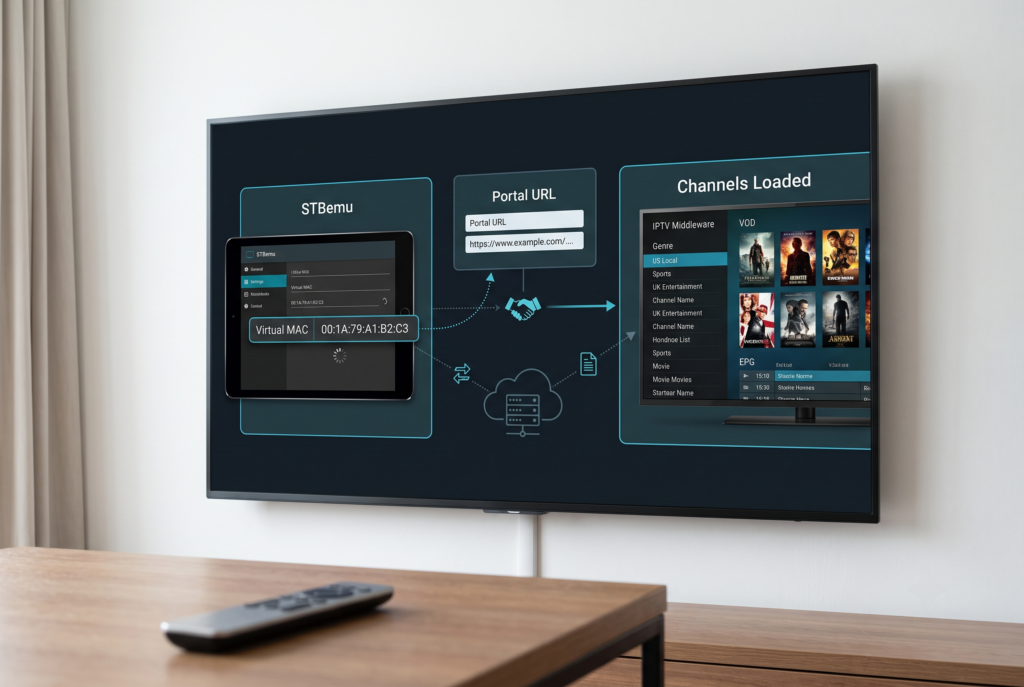
STBemu works through a portal-and-MAC model rather than through username-and-password playlist access. The app talks to Stalker/Ministra-style middleware, which is the server-side system many MAG-compatible IPTV services use.
2.1 Portal-based streaming explained
- The user enters a portal URL supplied by the IPTV provider.
- STBemu sends a handshake request to that portal.
- The provider checks the MAC address against its subscriber records.
- If the MAC is active, the portal returns channel lists, VOD, categories, and EPG data.
This matters because the portal is the main access point, so the app setup alone is not enough. The provider must also have the MAC activated correctly, or the app will not load content.
2.2 MAC address authentication and device emulation
- MAC authentication is the core of the system because the provider identifies the user by MAC rather than by an M3U login.
- STBemu generates a virtual MAC inside its STB configuration area.
- The user or reseller then sends that MAC to the provider for activation.
- The app can emulate a MAG model so the provider treats it like a real MAG device.
2.3 Role of providers and middleware
- The provider controls channel availability, categories, favourites, and EPG data through its middleware.
- Stalker/Ministra middleware is the server-side system that powers many portal-based services.
- Buffering and missing channels are often caused by overloaded servers or weak provider routing rather than the app itself.
- If favourites reset or channel order changes, the issue is usually on the provider side.
3. Key Features and STBemu Pro
The free version covers the core MAG-emulation workflow, while STBemu Pro is mainly a cleaner, ad-free upgrade. For most users, the real difference is convenience and polish, not a separate streaming engine.
3.1 Core features of the free version
- MAG-style remote support and color-button navigation.
- Multiple portal profiles and portal URL management.
- STB configuration tools such as model selection and MAC details.
- Playback controls including media player choice, hardware acceleration, and buffer size.
- Ads and a default demo portal are included in the free app.
3.2 What STBemu Pro adds
| Feature | Free version | STBemu Pro |
| Ads | Yes | No |
| Interface | More cluttered | Cleaner and lighter |
| Main streaming function | Same portal-based playback | Same portal-based playback |
| Best use case | Testing or occasional use | Daily use and demos |
STBemu Pro is best understood as a convenience upgrade, not a different product. It is helpful for people who use the app daily, manage clients, or want a cleaner interface on lower-power devices.
3.3 When upgrading makes sense
- Upgrade if you use the app every day and want to avoid ad interruptions.
- Upgrade if you use it for reseller demos and want a smoother presentation.
- Stay on the free version if you are only testing a provider or using a backup device.
- Consider Pro if ads and UI clutter become annoying on a weaker device.
4. Supported Formats and Compatibility
STBemu is built for portal URLs, not playlist files, so choosing the right IPTV provider is essential. It also depends heavily on the Android device’s decoder and on the quality of the provider’s streams.
4.1 Portal URLs vs M3U playlists
| Format | STBemu support | What it means |
| Portal URL | Yes | This is the normal setup method |
| M3U playlist | No | STBemu does not support playlist-based access |
If a provider only offers M3U or Xtream Codes, STBemu is not the right app. It is meant for MAG-style portal services with MAC authentication.
4.2 Device compatibility
- Android TV devices support direct installation in many cases.
- Firestick users often sideload the app with Downloader.
- Android phones and tablets can install it from Google Play.
- Compatibility may vary by device generation, region, and Android version.
Weak hardware can struggle with IPTV decoding, especially for 4K streams or poorly optimized providers. Older boxes may also need more careful buffer and player tuning.
4.3 Video formats, EPG, and playback support
- Playback depends on both the app settings and the provider’s stream format.
- Common delivery methods include HLS and MPEG-TS-style IPTV streams.
- EPG and favourites usually come from the portal, not from the app itself.
- Hardware acceleration and player selection can affect smoothness and stability.
5. Step-by-Step Setup Guide
The setup flow is usually the same: install the app, enter the portal URL, note the virtual MAC, activate it with the provider, and then tune playback settings. The biggest setup mistake is treating STBemu like a playlist app, because it is not built that way.
5.1 Installing the app on different devices
- On Firestick, enable unknown app installs, install Downloader, then sideload the APK.
- On Android TV, use Google Play when available, or sideload the APK if needed.
- On phones and tablets, install STBemu or STBemu Pro directly from Google Play.
- On every device, launch the app and open the configuration screen before trying to play channels.
5.2 Configuring portal URL and MAC address
- Open STBemu and go to the profile or portal settings area.
- Replace the demo portal URL with the portal URL supplied by your IPTV provider.
- Go to STB configuration and copy the virtual MAC address shown there.
- Send the MAC address to the provider exactly as shown so they can activate it.
- Relaunch the app after activation so it can load channels and EPG data.
The MAC format must be correct, because even a small typo can stop authorization. Some providers also expect a specific MAG model selection for better compatibility.
5.3 Adjusting video and buffer settings
- Select a media player option that works well with IPTV streams, such as the built-in IPTV-focused player option.
- Increase buffer size if your device has enough memory and the stream keeps stuttering.
- Turn on hardware acceleration on devices that handle it well.
- Avoid aggressive buffering changes on low-end devices, because they can cause crashes instead of improving playback.
6. Performance Optimization and Troubleshooting
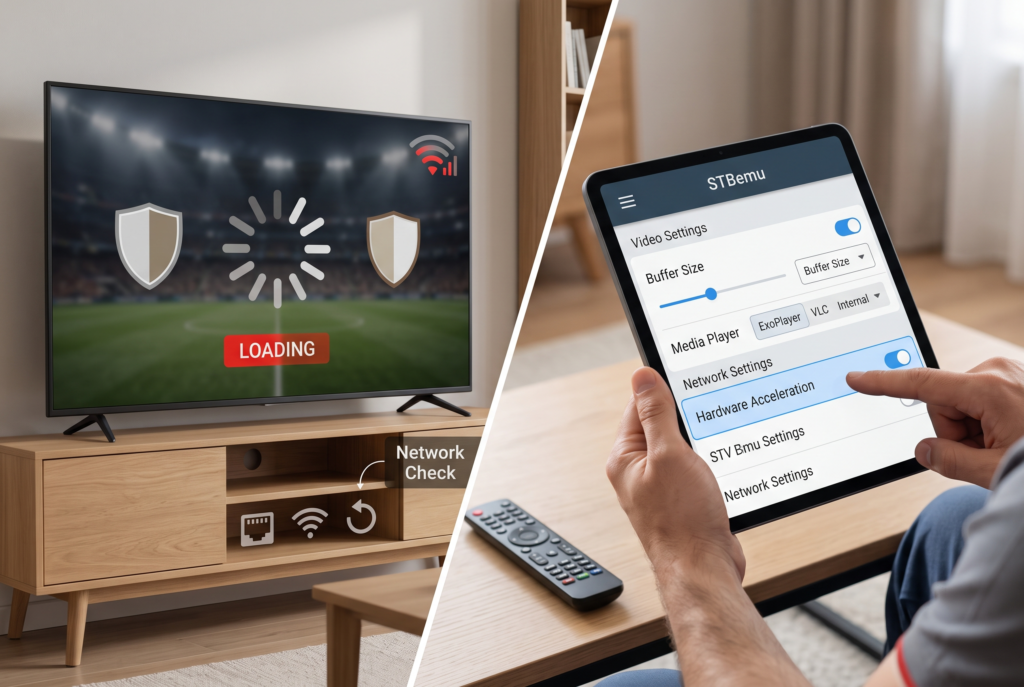
Most STBemu problems come from either the network, the provider, or incorrect setup rather than the app itself. A good troubleshooting routine separates local device problems from server-side issues.
6.1 Fixing buffering and loading issues
- Check whether the buffering happens on all channels or only on certain streams.
- Increase buffer size and restart the app if playback stutters.
- Close background apps and clear unnecessary cache on low-powered devices.
- If buffering happens during peak hours, the provider may be overloaded.
6.2 Network and DNS optimization tips
- Use Ethernet when possible for the most stable connection.
- Prefer 5 GHz Wi-Fi over congested 2.4 GHz Wi-Fi.
- DNS changes can help in some setups, but they are not a cure-all.
- A VPN may help with privacy or traffic shaping, but it does not make unlicensed content legal.
6.3 Common errors and quick fixes
| Problem | Likely cause | Quick fix |
| Authorization failed | Wrong or inactive MAC | Recheck the MAC and ask the provider to activate it |
| Empty channel list | Wrong portal URL or inactive account | Confirm the portal address and subscription status |
| Missing EPG | Provider-side data issue | Ask the provider to refresh EPG data |
If favorites keep resetting or channels disappear, the cause is often provider-side middleware settings rather than an app fault.
7. Security and Legal Considerations
The app itself is legitimate software, but the legality of what you watch depends on the IPTV service behind it. Licensed IPTV is different from unlicensed restreaming, and that difference matters in every region covered here.
7.1 Is IPTV usage legal in different regions
| Region | General rule |
| Canada | Licensed IPTV is legal; unlicensed restreaming is risky or illegal |
| US | Licensed services are legal; pirated streams can trigger enforcement and ISP warnings |
| UK | IPTV technology is legal; content rights and TV Licence rules still matter |
| UAE | Legal use depends on licensing and local compliance |
| India | Licensed platforms are fine; grey-market services are risky |
| Singapore | Licensed IPTV/OTT services are legal |
| Australia and New Zealand | Legality depends on licensing, not the app itself |
7.2 Risks of unauthorized services
- Services can shut down without warning.
- Unknown APKs can contain malware or steal account details.
- Weak or suspicious providers may expose users to warnings or disputes.
- “Lifetime” or unrealistically cheap offers are common red flags.
7.3 Safe usage practices
- Use licensed services where possible.
- Choose providers with clear support, transparent pricing, and realistic claims.
- Treat VPNs as privacy or stability tools, not as a way to legalize content.
- Avoid sharing MAC details publicly and keep account details organized.
8. Regional Setup Tips and Considerations
Regional performance often comes down to routing, latency, and provider quality rather than the app itself. Users in different markets face different stability issues, especially for live sports and high-bitrate streams.
8.1 Canada and US: ISP throttling and VPN usage
- Buffering may come from congestion, traffic shaping, or major sports traffic spikes.
- Ethernet and strong North American routing can improve stability.
- A VPN may help in some cases, but it is mainly for privacy and routing consistency.
8.2 UK: content restrictions and provider stability
- Licensed services remain the safest option for live TV.
- Stability often depends on server quality and ISP routing rather than the app.
- Testing at peak and off-peak hours can reveal whether the issue is network-related.
8.3 Asia (UAE, India, Singapore): connectivity and compliance
- Local POPs and low-latency routing matter for smooth playback.
- Users should prefer clearly licensed services whenever possible.
- Strong regional routing can matter more than raw speed in everyday use.
8.4 Oceania (Australia, New Zealand): latency and server selection
- Distance to the server can affect live sports and 4K playback.
- Providers with closer servers or stronger CDNs usually perform better.
- A VPN may help privacy or routing, but it does not change the legal status of the stream.
9. For Resellers: Managing Portals and Clients
Resellers need consistency, clear onboarding, and fast troubleshooting because MAC-based access becomes harder to manage at scale. STBemu works well in this environment when portal setup, device notes, and support steps are standardized.
9.1 Setting up and maintaining IPTV portals
- Organize channel packages and monitor portal uptime regularly.
- Keep EPG sync healthy so customers do not see missing guide data.
- Use secure portal practices and unique portal URLs where appropriate.
- Track which portal belongs to which customer so support is faster.
9.2 Handling customer devices and MAC assignments
- Use a unique MAC for each customer unless your plan explicitly allows more than one device.
- Do not reuse MACs across active subscriptions.
- Give customers clear device-specific setup instructions.
- Keep MAC sharing limited to support channels instead of public messages.
9.3 Scaling and support best practices
- Separate device-side issues from server-side issues before escalating support.
- Offer trials when possible so customers can check compatibility first.
- Use clear terms, support hours, and realistic performance expectations.
- Standardize the recommended STBemu settings for quicker onboarding.
10. Frequently Asked Questions
What is STBemu?
STBemu is an Android app that emulates MAG-style IPTV boxes so users can access portal-based IPTV services on devices like Firestick, Android TV, tablets, and phones.
Is STBemu legal?
The app itself is legal software; legality depends on the IPTV service you connect to, because licensed services are lawful while unlicensed pirated streams are risky or illegal.
How do I set up STBemu?
Install the app, enter your provider’s portal URL, note the virtual MAC address, send that MAC to the provider for activation, and then adjust playback settings if needed.
Does STBemu support M3U playlists?
No. STBemu is designed for portal-based MAG-style access, so M3U playlist users need a different app.
Why is STBemu buffering or not loading channels?
The usual causes are network congestion, provider overload, a wrong MAC, an incorrect portal URL, or an inactive account; buffer settings can help, but they are only part of the fix.
11. Conclusion
STBemu is best suited for users who need MAG-style IPTV access on Android devices without buying dedicated hardware. Its main strength is simple in concept but technical in practice: a portal URL, a valid MAC address, and the right provider support all need to line up before channels, VOD, and EPG will load correctly. For streamers, that means choosing a provider that actually supports portal-based access and offers stable performance. For resellers, it means keeping MAC assignments organized, giving clear setup instructions, and separating app issues from provider-side problems.
The app is not a playlist player, so users who only have M3U access will need a different solution. Performance also depends heavily on device quality, network stability, and server routing, especially across Canada, the US, the UK, Asia, and Oceania. If buffering, missing channels, or authorization errors appear, the fix is usually in the portal details, MAC activation, or connection quality rather than the app itself.
For anyone considering this setup, the smartest next step is to confirm provider compatibility before installation and then tune the app settings only after the portal is active.